
August 21, 2025
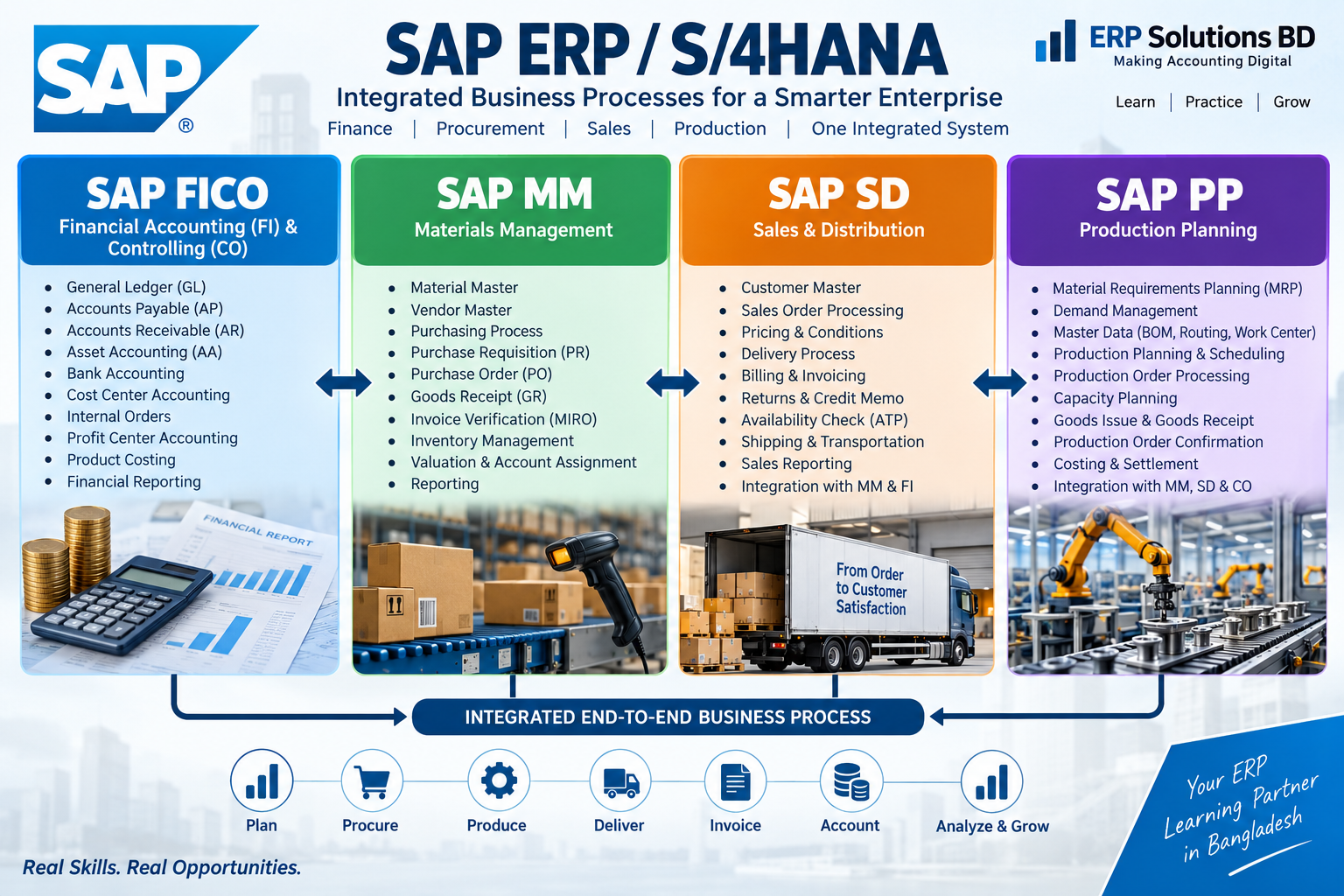
SAP FICO MM SD PP END User Training Outline-Configuration & Outline
-
 By Admin Erp Solution
- SAP FICO, MM SD & PP—Module Configuration and End-User Training Outline
Purpose
This outline covers two parallel tracks for each module (FICO, MM, and SD):
- Configuration (Consultant/Functional track)—the customizing (SPRO) steps needed to make the module operational.
- End-User Training (Business track)—the transactional knowledge business users need to run day-to-day operations.
It also covers cross-module integration points and a suggested training delivery approach.
1. SAP FICO — Finance & Controlling
1.1 FI (Financial Accounting) Configuration
A. Enterprise Structure
- Define Company / Company Code
- Assign Company Code to Company
- Define Business Area / Segment
- Fiscal Year Variant (define & assign to Company Code)
- Posting Period Variant (define & assign)
- Define Chart of Accounts (Operating, Group, Country)
- Assign Chart of Accounts to Company Code
- Define Account Groups & Field Status Groups
- Define the Retained Earnings Account
B. General Ledger Accounting (New GL)
- Activate New GL / Document Splitting
- Define Ledgers, Ledger Groups
- Define Currencies (Local, Group, Hard, Index)
- Define Document Types & Number Ranges
- Define Posting Keys
- Define Tolerance Groups for GL Accounts / Employees
- GL Master Data creation (FS00)—configuration of templates
- Define Financial Statement Version (FSV)
C. Accounts Payable (AP)
- Define Vendor Account Groups
- Number Ranges for Vendor Master
- Define Payment Terms
- Define Tolerance Groups for Vendors
- Automatic Payment Program (APP) configuration—F110 setup (paying company codes, payment methods, bank determination, house banks)
- Withholding Tax (TDS) configuration
- Down Payment / Advance Configuration
- Dunning procedure (if applicable to vendors)
D. Accounts Receivable (AR)
- Define Customer Account Groups
- Number Ranges for Customer Master
- Define Payment Terms & Tolerance Groups
- Dunning Procedure configuration
- Credit Management basic settings (or integration with FSCM Credit Management)
- Interest Calculation Configuration
- Bill of Exchange / Check processing (region-specific)
E. Bank Accounting
- Define House Banks & Bank Accounts
- Define Bank Master Data
- Check Lots / Void Reasons
- Electronic Bank Statement (EBS) configuration
- Cash Journal setup (FBCJ)
F. Asset Accounting (AA)
- Define Chart of Depreciation
- Assign Chart of Depreciation to Company Code
- Define Asset Classes
- Define Number Ranges for Assets
- Screen Layout Rules
- Depreciation Areas & Depreciation Keys
- Define Account Determination for Asset Classes
- Integration with GL (Asset G/L Account Assignment)
- Legacy Asset Data Transfer configuration
G. Controlling (CO) Foundation
- Maintain Controlling Area
- Assign Company Code(s) to Controlling Area
- Activate Components (Cost Center Accounting, Order Management, Profit Center Accounting, COPA)
- Number ranges for CO documents
H. Cost Element Accounting
- Create Primary & Secondary Cost Elements
- Cost Element Groups
I. Cost Center Accounting
- Define Cost Center Standard Hierarchy
- Create Cost Centers & Cost Center Groups
- Define Activity Types
- Statistical Key Figures
- Assessment / Distribution Cycles
J. Internal Orders
- Define Order Types
- Settlement Profiles & Rules
- Planning and budgeting settings
K. Profit Center Accounting
- Define Profit Center Standard Hierarchy
- Create Profit Centers & Groups
- Assign Profit Centers to Cost Centers/Materials
L. Product Costing (if manufacturing scope)
- Costing Variant, Costing Sheet
- Define Cost Component Structure
- Overhead Structures
- Work in Process (WIP) / Variance Calculation settings
M. Profitability Analysis (COPA)
- Define Operating Concern
- Characteristics & Value Fields
- Define Costing-Based vs. Account-Based COPA
- Derivation Rules & Assessment to COPA
1.2 FICO End-User Training Outline
Module 1: Navigation & Basics
- SAP Logon, Easy Access Menu, T-codes vs. Fiori Apps
- SAP GUI navigation, favorites, session management
Module 2: General Ledger
- Create/Change/Display GL Master (FS00)
- Post GL Journal Entries (FB50/F-02)
- Park & Post documents
- Display/Change Line Items (FBL3N), Account Balances (FS10N)
- Document Reversal (FB08)
- Month-End Closing activities (recurring entries, accruals)
Module 3: Accounts Payable
- Create/Change Vendor Master (XK01/FK01)
- Post Vendor Invoice (FB60/MIRO for PO-based)
- Vendor Down Payment (F-47/F-48)
- Outgoing Payment Processing (F-53/F110 – Automatic Payment Run)
- Vendor Line Item Display (FBL1N)
- Credit Memo processing
Module 4: Accounts Receivable
- Create/Change Customer Master (XD01/FD01)
- Post Customer Invoice (FB70)
- Incoming Payment Processing (F-28)
- Dunning Run execution (F150)
- Customer Line Item Display (FBL5N)
- Credit Memo / Debit Memo processing
Module 5: Asset Accounting
- Create Asset Master (AS01)
- Asset Acquisition (F-90/MIGO for PO-based assets)
- Depreciation Run (AFAB)
- Asset Retirement/Sale (F-92, ABAVN)
- Asset Reports (AW01N)
Module 6: Bank & Cash
- Cash Journal entries (FBCJ)
- Manual/Electronic Bank Reconciliation
- Check processing
Module 7: Controlling
- Cost Center Planning & Reporting (KSB1, S_ALR* reports)
- Internal order creation and settlement
- Manual reposting of costs (KB11N)
Module 8: Reporting
- Financial Statement reports (S_ALR_87012284, FBL3N)
- Trial Balance, Vendor/Customer Aging Reports
- COPA reporting (KE30)
2. SAP MM — Materials Management
2.1 MM Configuration
A. Enterprise Structure
- Define Plant, Storage Location
- Define Purchasing Organization
- Assign Purchasing Org to Company Code / Plant
- Define Purchasing Groups
B. Material Master
- Define Material Types & Number Ranges
- Field Selection / Screen Sequences
- Material Groups
C. Vendor Master (Purchasing View)
- Vendor Account Groups (Purchasing)
- Partner Determination (Ordering Address, Goods Supplier, Invoice Presenter, Payee)
D. Purchasing
- Define Document Types (PR, RFQ, PO, Contract, Scheduling Agreement)
- Define Number Ranges for Purchasing Documents
- Release Procedure (Release Strategy) for PR & PO
- Define Pricing Procedure (Calculation Schema) for Procurement
- Condition Types & Access Sequences
- Source List / Quota Arrangement Configuration
- Define Tolerance Keys (Price/Quantity Variance)
E. Inventory Management
- Define Movement Types
- Number Ranges for Material Documents
- Define reservation types
- Physical Inventory configuration
- Batch Management (if applicable)
F. Valuation & Account Determination
- Define Valuation Class & Valuation Area
- Automatic Account Determination (OBYC)—configure GL accounts per transaction key (BSX, WRX, GBB, PRD, etc.)
- Price Control (Standard/Moving Average) settings
- Split Valuation configuration (if needed)
G. Invoice Verification (Logistics Invoice Verification)
- Define Tolerance Limits for Invoice Verification
- Automatic settlements (ERS – Evaluated Receipt Settlement)
- Tax code / condition configuration for procurement
H. Special Procurement Processes
- Subcontracting configuration
- Consignment configuration
- Stock Transport Order (STO) configuration
- Third-party/drop-ship configuration
- Service procurement (framework)
2.2 MM End-User Training Outline
Module 1: Master Data
- Create/Change/Display Material Master (MM01/MM02/MM03)
- Create/Change Vendor Master (XK01/MK01)
- Info Records (ME11)
- Source List (ME01)
Module 2: Procure-to-Pay Cycle
- Create Purchase Requisition (ME51N)
- Convert PR to RFQ / PO (ME21N)
- Release Purchase Orders (ME28/ME29N)
- Contract & Scheduling Agreements (ME31K/ME31L)
- Goods Receipt against PO (MIGO)
- Invoice Verification (MIRO)
- Vendor Payment (link to FI – F110/F-53)
Module 3: Inventory Management
- Goods Issue / Goods Receipt (MIGO, MB1A/MB1C)
- Stock Transfers (MB1B)
- Physical Inventory (MI01, MI04, MI07)
- Stock Overview (MMBE)
- Reservation processing (MB21)
Module 4: Special Processes
- Subcontracting transactions
- Consignment process (goods receipt, settlement)
- Stock Transport Order execution
- Return delivery to vendor (MIGO – Return)
Module 5: Reporting
- Purchase Order/PR reporting (ME2M, ME2L)
- Stock reports (MB52, MC.9)
- Vendor evaluation reports
3. SAP SD — Sales & Distribution
3.1 SD Configuration
A. Enterprise Structure
- Define Sales Organization
- Define Distribution Channel
- Define Division
- Set up Sales Area (Sales Org. + Distribution Channel + Division)
- Assign Sales Org to Company Code
- Define Shipping Point & Loading Point
- Assign Shipping Points to Plants
B. Master Data Configuration
- Customer Account Groups (Sales View) & Number Ranges
- Partner Determination Procedure (Sold-to, Ship-to, Bill-to, Payer)
- Material Master – Sales Views field configuration
- Customer-Material Info Records setup
- Output Determination (print/email confirmations, invoices)
C. Sales Document Configuration
- Define Sales Document Types (Inquiry, Quotation, Order, Contract)
- Define Item Categories & Item Category Determination
- Define Schedule Line Categories
- Copy Control between document types
- Number Ranges for Sales Documents
D. Pricing
- Define Condition Tables, Access Sequences, and Condition Types
- Define Pricing Procedure & Determination
- Condition Records maintenance strategy
- Tax determination (tax condition types, jurisdiction if applicable)
- Rebate/Discount configuration (if applicable)
E. Availability Check & Transfer of Requirements
- Define Checking Groups & Checking Rules
- Configure ATP (Available-to-Promise) settings
F. Shipping & Transportation
- Define Delivery Types
- Delivery Item Categories
- Route Determination
- Picking, Packing Configuration
- Define Shipping Conditions
G. Billing
- Define Billing Types (Invoice, Credit Memo, Debit Memo, Proforma)
- Billing Document Copy Control
- Account Determination for Billing (Revenue Account Determination — VKOA)
- Invoice List / Consolidated Billing settings
H. Credit Management
- Define Credit Control Area
- Assign Credit Control Area to Company Code
- Credit Limit checks (Simple/Automatic)—integration with FSCM Credit Management if used
I. Intercompany & Special Sales Processes
- Intercompany Sales configuration
- Third-party sales order processing
- Consignment Sales (Fill-up, Issue, Pick-up, Return)
- Returns & Free Goods configuration
3.2 SD End-User Training Outline
Module 1: Master Data
- Create/Change/Display Customer Master (XD01/VD01)
- Material Master – Sales views
- Customer-Material Info Records (VD51)
- Condition Records / Pricing Maintenance (VK11)
Module 2: Order-to-Cash Cycle
- Create Inquiry (VA11) / Quotation (VA21)
- Create Sales Order (VA01)
- Change/Display Sales Order (VA02/VA03)
- Availability Check Review
- Credit block release process (VKM3/VKM4)
Module 3: Shipping & Delivery
- Create Outbound Delivery (VL01N)
- Picking confirmation (VL02N / LT03 if using WM)
- Post Goods Issue (PGI)
- Packing process
Module 4: Billing
- Create Billing Document / Invoice (VF01)
- Billing Document Cancellation (VF11)
- Credit/Debit Memo processing (VA01 with respective doc type, VF01)
- Proforma invoice creation
Module 5: Special Processes
- Returns processing (VA01 – Return order, VL01N, VF01 – Credit memo)
- Consignment process execution
- Third-party order processing
Module 6: Reporting
- Sales Order/Delivery/Billing list reports (VA05, VL06O, VF05)
- Incompletion log review (VA02 – incompletion)
- Customer-specific sales reports (SIS/LIS or standard reports)
4. Cross-Module Integration Points
Integration Key Touchpoints MM–FI Goods Receipt/Invoice Verification triggers GL postings via OBYC account determination; vendor payment flows to AP. SD–FI The billing document triggers revenue posting via VKOA account determination; customer receivables flow to AR. MM–SD Stock availability from MM feeds ATP check-in SD; delivery/goods issue reduces inventory maintained via MM. SD–CO Billing can post to COPA (value fields) for profitability reporting. MM–CO Goods movements for cost centers/orders post- consumption to controlling A short integration testing session (order-to-cash and procure-to-pay end-to-end walkthroughs) is recommended after individual module configuration is complete.
**ERP Solutions BD Presents – SAP FICO, MM & SD End User & Configuration Training | Batch-17**
